Best Head Up Displays for Aftermarket Installation
Review the best head-up display HUD units available for aftermarket installation in any car.
Review the best head-up display HUD units available for aftermarket installation in any car.
Best Head Up Displays for Aftermarket Installation
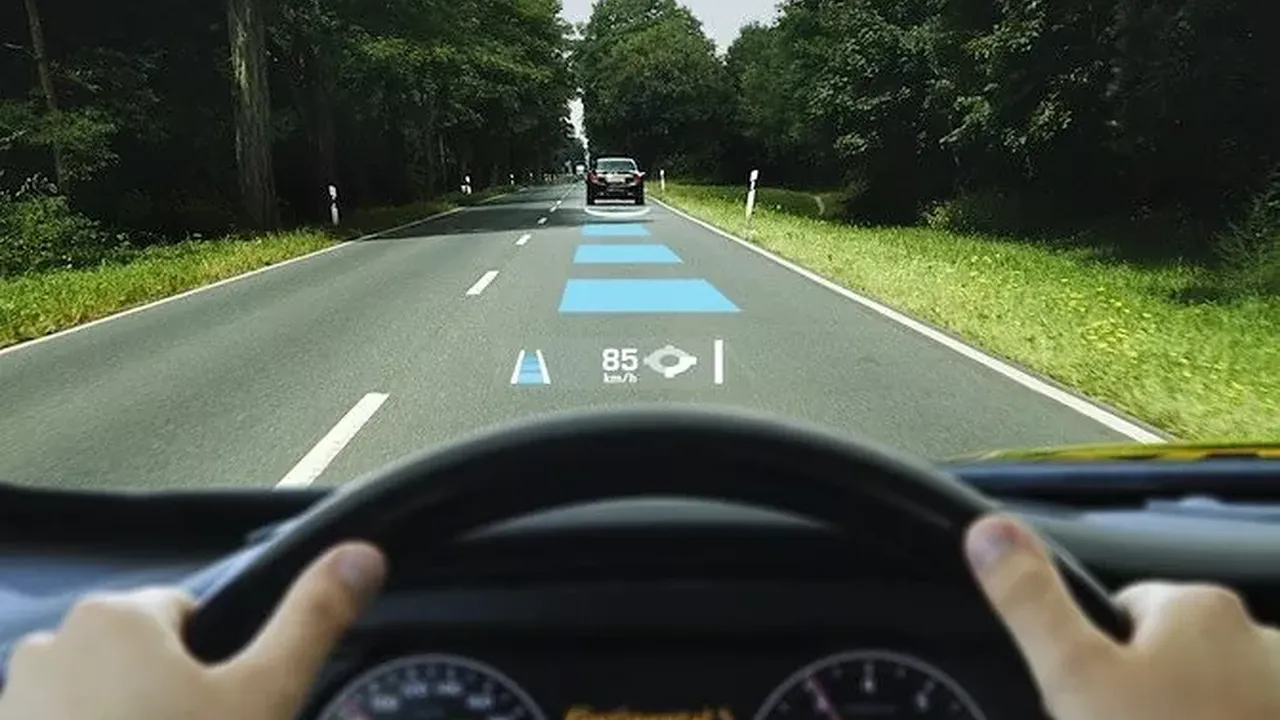
Hey there, fellow drivers! Ever wished you could keep your eyes glued to the road while still getting all that crucial info like your speed, navigation directions, or even who's calling? Well, that's exactly what a Head-Up Display, or HUD, is designed to do. Originally a fancy feature in fighter jets and high-end luxury cars, HUDs are now super accessible for pretty much any vehicle thanks to some awesome aftermarket options. No need to buy a brand-new car just for this tech!
Aftermarket HUDs project vital driving data directly onto your windshield or a small, transparent screen on your dashboard. This means less looking down at your instrument cluster or phone, and more focus on what's happening ahead. It's a game-changer for safety and convenience, especially if you're driving in busy city traffic or navigating unfamiliar routes. But with so many options out there, how do you pick the right one? That's where we come in! We're going to dive deep into the best aftermarket HUDs, comparing their features, ease of installation, and overall value for money. Let's get your driving experience upgraded!
Understanding Aftermarket HUD Technology and Benefits for Drivers
Before we jump into specific products, let's quickly chat about what makes aftermarket HUDs tick and why they're such a smart addition to your ride. Most aftermarket HUDs connect to your car's On-Board Diagnostics (OBD-II) port, which has been standard on all cars sold in the US since 1996 and many in Southeast Asia. This port provides real-time data like vehicle speed, RPM, fuel consumption, water temperature, and even battery voltage. Some advanced HUDs also integrate with GPS for navigation, or even connect to your smartphone via Bluetooth for call alerts and music control.
The primary benefit? Enhanced safety. By keeping your eyes on the road, you reduce the time your gaze is diverted, which can be critical in preventing accidents. Think about it: a quick glance down at your speedometer at 60 mph means you've traveled a significant distance blind. With a HUD, that information is right in your line of sight. Beyond safety, it's just plain convenient. Navigation instructions appear right where you need them, making turns less stressful. Plus, let's be honest, it just feels cool to have futuristic tech in your car!
Types of Aftermarket HUDs: Windshield Projection vs. Combiner Display
When you're looking at aftermarket HUDs, you'll generally find two main types: windshield projection and combiner display. Each has its own pros and cons.
- Windshield Projection HUDs: These are what most people imagine when they think of a HUD. A projector unit sits on your dashboard and beams the information directly onto your windshield. The quality of the projection can vary greatly depending on the unit and your windshield's tint. Some drivers might experience a 'double image' or ghosting effect, especially on older or non-OEM windshields. To combat this, many come with a reflective film you can apply to your windshield, which significantly improves clarity but might not be everyone's aesthetic preference.
- Combiner Display HUDs: These units project information onto a small, transparent screen (often called a 'combiner') that's attached to the HUD unit itself. This screen sits on your dashboard, usually just above your steering wheel. The advantage here is that you almost never get ghosting, and the image is typically sharper and brighter because it's projected onto a dedicated surface. The downside is that there's a physical screen on your dash, which some might find a bit intrusive compared to the 'invisible' projection of a windshield HUD.
Both types offer similar functionalities, so your choice often comes down to personal preference for display method and how much you mind a small screen on your dashboard.
Top Aftermarket HUDs for Enhanced Driving Experience
Alright, let's get to the good stuff! We've scoured the market to bring you some of the best aftermarket HUDs available right now. We'll look at their key features, what makes them stand out, and who they're best suited for.
1. HUDWAY Glass: The Premium Combiner Display for Navigation and Speed
If you're looking for a premium experience with crystal-clear visuals, the HUDWAY Glass is often a top contender. It's a combiner-style HUD that works seamlessly with your smartphone. Instead of projecting onto your windshield, it uses its own high-quality transparent screen.
Key Features and Specifications:
- Display Type: Combiner display, offering superior clarity and no ghosting.
- Connectivity: Primarily works with your smartphone via Bluetooth. It's designed to be used with the HUDWAY Go app (available for iOS and Android), which provides excellent turn-by-turn navigation, speed, and traffic alerts.
- Information Displayed: Speed, navigation directions, distance to destination, estimated arrival time, and sometimes even current time.
- Brightness: Excellent brightness, making it visible even in direct sunlight. It often adjusts automatically.
- Installation: Super easy. It just sits on your dashboard and plugs into a USB power source (either your car's USB port or a cigarette lighter adapter).
- Compatibility: Universal, as it relies on your smartphone for data.
- Price Range: Typically in the $50-$100 range.
Use Cases and Target Audience:
The HUDWAY Glass is perfect for drivers who primarily want a clear, reliable navigation display without the hassle of windshield film or potential ghosting. It's fantastic for road trips, daily commutes in unfamiliar areas, or anyone who finds themselves constantly glancing at their phone for directions. Because it uses your phone's GPS, it's always up-to-date with maps and traffic. It's also a great choice for older cars that lack built-in navigation systems.
Pros and Cons:
- Pros: Extremely clear display, no ghosting, easy installation, works with any car, excellent navigation features through the app.
- Cons: Relies on your smartphone (which means your phone battery drains faster), doesn't display OBD-II data like RPM or engine temperature, some might find the physical combiner screen a bit large on the dash.
2. Pyle Universal Car HUD: OBD-II Data and Speed for Everyday Driving
Pyle is a well-known brand in car electronics, and their universal car HUDs are popular for their straightforward functionality and affordability. Many Pyle models are OBD-II based, offering a direct connection to your car's computer.
Key Features and Specifications:
- Display Type: Often windshield projection, though some models might offer a small combiner screen.
- Connectivity: Plugs directly into your car's OBD-II port.
- Information Displayed: Speed, RPM, water temperature, battery voltage, fuel consumption, and sometimes even fault codes.
- Brightness: Adjustable brightness, usually with an ambient light sensor for automatic adjustment.
- Installation: Plug-and-play with the OBD-II port. For windshield projection, it often comes with a reflective film to improve clarity.
- Compatibility: Works with most OBD-II compliant vehicles (generally 2000 and newer for US, and varying for Southeast Asia but increasingly common).
- Price Range: Very affordable, typically $30-$60.
Use Cases and Target Audience:
The Pyle Universal Car HUD is ideal for drivers who want essential vehicle data like speed and RPM projected onto their windshield without breaking the bank. It's great for monitoring engine health (via water temp and voltage) and ensuring you're not speeding. If your car's speedometer is hard to read or you just prefer having your speed directly in your line of sight, this is a solid, budget-friendly option. It's also a good choice for those who don't need navigation features from their HUD.
Pros and Cons:
- Pros: Affordable, displays a wide range of OBD-II data, easy plug-and-play installation, universal for most modern cars.
- Cons: Windshield projection can suffer from ghosting without the film, no navigation features, display quality might not be as crisp as combiner-style HUDs.
3. AUTOOL X60 OBD-II HUD: Compact and Feature-Rich for Performance Monitoring
The AUTOOL X60 is another popular OBD-II based HUD that's known for its compact size and comprehensive data display. It's a great option if you want a lot of information without a huge device on your dash.
Key Features and Specifications:
- Display Type: Often a small, integrated LED screen that sits on your dash, though some models might offer windshield projection.
- Connectivity: Connects directly to your car's OBD-II port.
- Information Displayed: Speed, RPM, water temperature, battery voltage, fuel consumption, intake pressure, oil temperature, and even acceleration tests. It's quite comprehensive for its size.
- Brightness: Good brightness with automatic adjustment.
- Installation: Simple plug-and-play.
- Compatibility: Works with most OBD-II compliant vehicles.
- Price Range: Around $40-$70.
Use Cases and Target Audience:
The AUTOOL X60 is perfect for car enthusiasts or anyone who likes to keep a close eye on their vehicle's performance and health. The ability to display oil temperature and intake pressure is a big plus for those who track their car or simply want more detailed engine diagnostics. Its compact size also makes it less intrusive than some larger HUD units. It's a fantastic tool for monitoring your car's vitals in real-time.
Pros and Cons:
- Pros: Very compact, displays a wide array of OBD-II data, easy to install, good value for money.
- Cons: Small screen might be harder to read for some, no navigation features, not a true 'head-up' display if it's just an integrated screen.
4. Garmin HUD+: GPS Navigation and Traffic Alerts for Seamless Journeys
Garmin, a giant in GPS technology, also offers an aftermarket HUD solution. The Garmin HUD+ is designed to integrate seamlessly with Garmin's smartphone navigation apps, bringing their renowned navigation capabilities to your windshield.
Key Features and Specifications:
- Display Type: Windshield projection or combiner lens (often included).
- Connectivity: Connects to your smartphone via Bluetooth and uses Garmin's StreetPilot or NAVIGON apps for navigation data.
- Information Displayed: Turn-by-turn directions, distance to next turn, current speed, speed limit, traffic camera alerts, and estimated arrival time.
- Brightness: Excellent brightness, automatically adjusts to ambient light.
- Installation: Plugs into your car's 12V power outlet. Comes with a reflective film for windshield projection or a combiner lens.
- Compatibility: Universal, as it relies on your smartphone.
- Price Range: Typically in the $100-$150 range.
Use Cases and Target Audience:
The Garmin HUD+ is the go-to choice for drivers who prioritize top-tier navigation. If you're already a fan of Garmin's navigation apps or want a dedicated HUD for turn-by-turn directions, this is an excellent option. It's particularly useful for frequent travelers, delivery drivers, or anyone who often finds themselves in unfamiliar territory. The traffic camera alerts are a nice bonus for avoiding unexpected tickets!
Pros and Cons:
- Pros: Superior navigation features, clear display (especially with combiner lens), integrates with trusted Garmin apps, traffic camera alerts.
- Cons: More expensive than basic HUDs, relies on smartphone (app subscription might be required for full features), doesn't display OBD-II vehicle data.
5. VGEBY Universal Car HUD: Budget-Friendly OBD-II and GPS Hybrid
The VGEBY Universal Car HUD often comes in various models, many of which offer a hybrid approach, combining OBD-II data with GPS functionality. This makes them quite versatile for their price point.
Key Features and Specifications:
- Display Type: Often windshield projection, sometimes with a small integrated screen.
- Connectivity: Plugs into OBD-II port for vehicle data, and often has a built-in GPS module for speed and navigation (though navigation is usually just direction arrows, not full maps).
- Information Displayed: Speed (from OBD or GPS), RPM, water temperature, battery voltage, fuel consumption, driving distance, driving time, and sometimes simple navigation arrows.
- Brightness: Adjustable brightness, often with automatic light sensing.
- Installation: Plug-and-play with the OBD-II port. Reflective film usually included.
- Compatibility: Works with most OBD-II compliant vehicles. GPS functions are universal.
- Price Range: Very competitive, often $30-$70.
Use Cases and Target Audience:
The VGEBY HUD is a great all-rounder for drivers who want a bit of everything without spending too much. If you want both vehicle diagnostics and basic navigation cues (like direction arrows to a pre-set destination), this hybrid model offers good value. It's suitable for daily commuters who want to monitor their speed and engine vitals, and occasionally need a little help with directions without pulling out their phone. It's a solid choice for those in Southeast Asia where OBD-II compatibility is becoming more widespread, and GPS speed can be a reliable backup.
Pros and Cons:
- Pros: Combines OBD-II and GPS data, affordable, displays a good range of information, relatively easy to install.
- Cons: Navigation is basic (no maps), windshield projection can have ghosting, build quality might not be as robust as higher-end brands.
Factors to Consider When Choosing Your Aftermarket HUD
Picking the perfect HUD isn't just about looking at the coolest features. You need to think about what really matters for your driving style and your car. Here are some key factors to keep in mind:
Compatibility and Installation: OBD-II vs. GPS Only HUDs
This is probably the first thing you need to check. Does your car have an OBD-II port? Most cars made after 1996 in the US and many newer models in Southeast Asia do. If so, an OBD-II HUD can give you a wealth of vehicle-specific data. If your car is older or doesn't have an accessible OBD-II port, a GPS-only HUD (like the HUDWAY Glass or Garmin HUD+) is your best bet. These rely on satellite signals for speed and location, making them universally compatible.
Installation for most aftermarket HUDs is pretty straightforward: plug into the OBD-II port or a 12V power outlet, place it on your dash, and you're good to go. Some windshield projection models might require applying a reflective film, which takes a little extra care to avoid bubbles.
Display Clarity and Brightness: Visibility in Various Lighting Conditions
What's the point of a HUD if you can't see it clearly? Look for models with good brightness that automatically adjust to ambient light. This ensures the display is visible in bright sunlight and not blinding at night. Combiner displays generally offer superior clarity and no ghosting compared to windshield projections, especially if your windshield isn't perfectly suited for HUDs. If you opt for windshield projection, make sure it comes with a high-quality reflective film.
Information Displayed: Speed Navigation RPM and More
Think about what information is most important to you. Do you just want your speed? Or do you need turn-by-turn navigation? Are you a car enthusiast who wants to monitor RPM, water temperature, and battery voltage? Some HUDs are simple speedometers, while others are mini-dashboards. Make sure the HUD you choose displays the data you actually need and will use.
Additional Features: Alerts Customization and Smartphone Integration
Beyond the basics, what else does the HUD offer? Some come with overspeed warnings, fatigue driving alerts, or even fault code diagnostics. Customization options, like changing display colors or layouts, can enhance your experience. Smartphone integration is a big one for navigation-focused HUDs, allowing them to leverage your phone's GPS and apps for real-time traffic and map updates. Consider if these extra bells and whistles are worth the potential extra cost.
Price and Value: Balancing Cost with Features and Quality
Aftermarket HUDs range from super affordable to moderately priced. As with most electronics, you often get what you pay for. A cheaper HUD might offer basic speed display but lack advanced features or have a less crisp projection. More expensive units typically offer better display quality, more features, and better smartphone integration. Set a budget, but also consider the long-term value and how much you'll actually benefit from the features offered.
Installation and Setup Tips for Your New HUD
Got your new HUD? Awesome! Here are some tips to get it set up perfectly and make sure you get the most out of it.
Optimal Placement for Best Visibility and Minimal Distraction
The placement of your HUD is crucial. For windshield projection, place the unit on your dashboard as close to the windshield as possible, usually centered in front of your steering wheel. Experiment with the angle until the projection is clear and doesn't interfere with your view of the road. For combiner displays, place it where the screen is comfortably in your line of sight without blocking too much of the road ahead.
Applying Reflective Film for Windshield Projection HUDs
If your HUD uses windshield projection and you're experiencing ghosting or a faint image, the reflective film is your friend. Clean your windshield thoroughly first. Then, lightly spray the area with water (a little dish soap can help). Apply the film carefully, smoothing out any bubbles with a squeegee. Take your time with this step; a well-applied film makes a huge difference in clarity.
Connecting to OBD-II Port and Power Sources
Most OBD-II HUDs simply plug into your car's OBD-II port, which is usually located under the dashboard on the driver's side. It's a standard trapezoidal connector. GPS-only HUDs typically plug into a 12V cigarette lighter socket or a USB port. Make sure the cables are neatly tucked away so they don't interfere with your driving or look messy.
Calibrating Speed and Other Settings for Accuracy
Some HUDs allow you to calibrate the speed display. It's a good idea to do this, especially for OBD-II units, as there can sometimes be a slight discrepancy between the HUD and your car's speedometer. You can often calibrate it against a GPS speed reading (from your phone or a dedicated GPS device) or by comparing it to a known accurate speedometer. Also, adjust brightness, display units (MPH/KMH), and any warning thresholds to your preference.
The Future of Aftermarket HUDs and Automotive Integration
The world of automotive tech is always evolving, and aftermarket HUDs are no exception. We're seeing some exciting trends that promise even more integration and functionality.
Augmented Reality HUDs: Next Level Navigation and Information
Imagine navigation arrows that appear to float directly on the road ahead, pointing exactly where you need to go. That's the promise of augmented reality (AR) HUDs. While still mostly in high-end OEM vehicles, aftermarket AR HUDs are starting to emerge. These systems use cameras and advanced projection technology to overlay digital information onto the real world, making navigation incredibly intuitive and immersive. Expect to see more affordable and accessible AR HUDs in the coming years, transforming how we interact with our driving environment.
Enhanced Smartphone Integration and Cloud Connectivity
As smartphones become even more central to our lives, aftermarket HUDs will likely deepen their integration. We'll see more seamless connectivity for not just navigation, but also for music control, messaging alerts, and even voice assistants. Cloud connectivity could allow HUDs to pull real-time data like parking availability, weather updates, or even personalized recommendations based on your route and preferences.
Advanced Driver Assistance System ADAS Integration
Many modern cars come with ADAS features like lane departure warnings, forward collision alerts, and blind-spot monitoring. Future aftermarket HUDs could integrate with these systems, projecting warnings directly into your line of sight. Imagine a red alert flashing on your windshield if you're drifting out of your lane, or a visual cue for an object in your blind spot. This would significantly enhance safety by making these warnings more immediate and noticeable.
So, whether you're looking for a simple speed display or a full-blown navigation assistant, there's an aftermarket HUD out there for you. They're a fantastic way to upgrade your car's tech, boost your safety, and make every drive a little more enjoyable. Happy driving!
:max_bytes(150000):strip_icc()/277019-baked-pork-chops-with-cream-of-mushroom-soup-DDMFS-beauty-4x3-BG-7505-5762b731cf30447d9cbbbbbf387beafa.jpg)