Comparing Augmented Reality Navigation Systems
A comparison of augmented reality AR navigation systems for an enhanced driving experience.
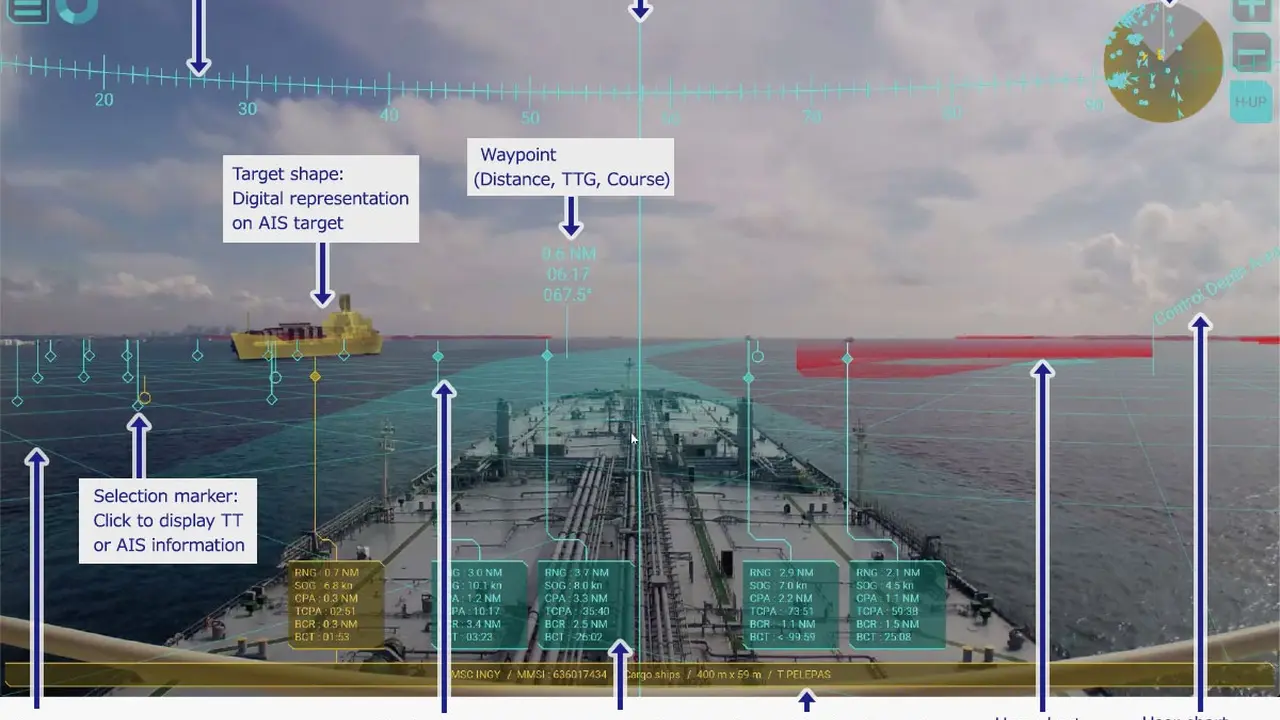
A comparison of augmented reality AR navigation systems for an enhanced driving experience.
Comparing Augmented Reality Navigation Systems for an Enhanced Driving Experience
The Rise of Augmented Reality in Automotive Navigation
Remember when GPS navigation was a groundbreaking feature? Now, we're moving beyond simple 2D maps and voice commands into a whole new dimension: Augmented Reality (AR) navigation. This isn't just about seeing a map on a screen; it's about overlaying digital information directly onto your real-world view of the road. Imagine turn-by-turn directions appearing as glowing arrows right on the asphalt ahead of you, or points of interest highlighted as you drive past them. It's like having a co-pilot with superpowers, making driving safer, more intuitive, and frankly, a lot cooler. For drivers in the US and Southeast Asia, where traffic can be complex and new routes are constantly emerging, AR navigation offers a significant upgrade to the traditional driving experience.
The core idea behind AR navigation is to bridge the gap between the digital world of maps and the physical world you're driving through. Instead of constantly glancing down at a screen, your eyes stay on the road, processing information more naturally. This technology leverages cameras, sensors, and advanced software to understand your surroundings and project relevant data. It's not just for luxury cars anymore; as the technology matures, we're seeing it trickle down into more mainstream vehicles and even aftermarket solutions. But with various systems emerging, how do you choose the best one for your needs? Let's dive into a detailed comparison.
Understanding How Augmented Reality Navigation Works Key Technologies and Components
Before we compare specific systems, it's helpful to understand the magic behind AR navigation. At its heart, AR navigation relies on several key technologies working in harmony:
- Cameras: These are the 'eyes' of the system, capturing the real-time view of the road ahead. High-resolution cameras are crucial for accurate object recognition and overlay.
- GPS and Inertial Measurement Units (IMUs): These provide precise location data, speed, and vehicle orientation, essential for knowing exactly where you are and which way you're heading.
- Mapping Data: Detailed 3D maps are necessary to accurately place digital overlays onto the real world. These maps often include lane data, building outlines, and terrain information.
- Image Processing and Computer Vision: This is where the 'intelligence' comes in. Software analyzes the camera feed to identify lanes, traffic signs, other vehicles, and pedestrians. It then uses this information to correctly position the AR elements.
- Display Technology: This is how you see the AR elements. It can be a head-up display (HUD) projected onto the windshield, a dedicated screen on the dashboard, or even a smartphone screen for aftermarket solutions.
- Processing Power: All this real-time data processing requires powerful onboard computers or smartphone processors to ensure smooth and lag-free performance.
When you combine these elements, the system can identify your current lane, predict your trajectory, and then project navigational cues like arrows, lane guidance, and points of interest directly onto your live view of the road. This significantly reduces cognitive load, as you don't have to translate a 2D map into a 3D real-world scenario in your head.
In Car Integrated AR Navigation Systems Top Picks and Features
Many premium car manufacturers are now integrating AR navigation directly into their vehicles. These systems often offer the most seamless and immersive experience, as they are designed specifically for the car's interior and sensors. Here are some of the leading examples:
Mercedes-Benz MBUX AR Navigation A Premium Experience
Mercedes-Benz was one of the pioneers in bringing AR navigation to the mainstream with its MBUX infotainment system. Their system uses the front-facing camera to display a live video feed on the central infotainment screen. On this feed, animated arrows, house numbers, and street names are overlaid, guiding you precisely. When you approach an intersection, the system zooms in, showing you exactly which lane to be in and where to turn. It's incredibly intuitive and reduces any guesswork, especially in complex urban environments like Bangkok or Los Angeles.
- Key Features: Live video feed with overlaid navigation instructions, precise lane guidance, automatic zoom at intersections, integration with voice control.
- User Experience: Highly praised for its clarity and ease of use. The visual cues are very natural and easy to follow.
- Availability: Available in many newer Mercedes-Benz models, including the A-Class, C-Class, E-Class, S-Class, and various SUVs.
- Estimated Cost: Typically part of a larger MBUX infotainment package, which can add several thousand dollars to the vehicle's price, depending on the trim level and optional extras. It's not a standalone purchase but an integrated feature.
- Pros: Seamless integration, high accuracy, excellent visual clarity, enhances safety by keeping eyes on the road.
- Cons: Only available in Mercedes-Benz vehicles, can be expensive as part of a premium package.
Audi MMI Navigation Plus with AR Elements A Sophisticated Approach
Audi's approach to AR navigation, often found in their MMI Navigation Plus system, focuses on enhancing the driver's perception without overwhelming them. While not a full live video overlay like Mercedes, Audi uses AR elements to highlight points of interest, parking spaces, and even traffic signs on the virtual cockpit display or head-up display. It's more about augmenting the existing map and driver information with contextual AR cues rather than a full video feed. This can be particularly useful in busy city centers like Singapore or New York, where finding specific locations can be tricky.
- Key Features: AR overlays for points of interest, parking, and traffic signs on virtual cockpit and HUD, predictive route guidance, detailed 3D city models.
- User Experience: Sophisticated and subtle, providing helpful information without being distracting.
- Availability: Found in higher trims of newer Audi models like the A6, A7, A8, Q7, and Q8.
- Estimated Cost: Integrated into the MMI Navigation Plus package, which is an optional extra that can range from $2,000 to $5,000 depending on the model and region.
- Pros: Elegant integration, useful contextual information, less visually intrusive than full video overlays.
- Cons: Not a full live video AR experience, can be an expensive option.
Hyundai Genesis AR Navigation A Growing Contender
Hyundai's luxury brand, Genesis, has also entered the AR navigation space, offering a compelling system that projects turn-by-turn directions onto a live camera feed on the central display. Similar to Mercedes-Benz, it aims for a highly intuitive visual guidance system. Genesis models like the GV80 and G80 feature this technology, providing a premium experience at a potentially more accessible price point than some European rivals. This makes it an attractive option for drivers in markets like the US and increasingly in Southeast Asia, where Genesis is expanding its presence.
- Key Features: Live camera feed with overlaid navigation, clear directional arrows, lane guidance, integrated with the vehicle's infotainment.
- User Experience: Straightforward and effective, making complex turns easy to navigate.
- Availability: Available in select Genesis models such as the GV80 and G80.
- Estimated Cost: Often included in higher trim levels or as part of a technology package, typically adding $1,500 to $3,000 to the vehicle's price.
- Pros: Good visual clarity, intuitive guidance, potentially better value than some competitors.
- Cons: Limited to Genesis vehicles, not as widely available as some other brands.
Aftermarket AR Navigation Solutions Expanding Your Options
What if your car doesn't come with integrated AR navigation? Don't worry, the aftermarket has you covered! These solutions often leverage your smartphone or dedicated devices to bring AR capabilities to older vehicles or those without factory-installed systems. They offer flexibility and can be a more budget-friendly way to experience AR navigation.
WayRay Navion A Dedicated AR HUD Device
WayRay is a company specializing in holographic AR technology. Their Navion system is designed as a dedicated aftermarket AR head-up display. It projects holographic navigation cues directly onto your windshield, creating a truly immersive experience. Unlike simple HUDs that just show speed, Navion overlays turn arrows, points of interest, and even pedestrian warnings directly onto your view of the road. It's a high-tech solution for those who want the full AR experience without buying a new car.
- Key Features: Holographic AR projection onto windshield, real-time navigation overlays, lane guidance, speed limits, pedestrian warnings.
- User Experience: Highly immersive and futuristic, keeps your eyes focused on the road.
- Availability: Can be purchased directly from WayRay or authorized distributors.
- Estimated Cost: This is a premium aftermarket solution, with prices typically ranging from $1,500 to $2,500, depending on the model and features.
- Pros: True holographic AR, works with any car, highly immersive.
- Cons: Expensive for an aftermarket device, installation might require professional help, can be bulky.
Sygic GPS Navigation with Real View Navigation A Smartphone Solution
Sygic is a popular GPS navigation app that offers a 'Real View Navigation' feature, which is essentially an AR mode. It uses your smartphone's camera to display a live view of the road, with navigation instructions overlaid on top. While it's not projected onto the windshield, having your phone mounted on the dashboard can still provide a helpful AR experience. It's a very accessible and affordable way to try out AR navigation, especially for drivers in Southeast Asia who rely heavily on smartphone navigation.
- Key Features: Smartphone camera-based AR overlay, turn-by-turn directions, lane assistance, speed limits, offline maps.
- User Experience: Convenient and easy to use, leverages existing smartphone hardware.
- Availability: Available as a feature within the Sygic GPS Navigation app on iOS and Android.
- Estimated Cost: The Sygic app itself has a free version with basic features, but the premium features including Real View Navigation typically cost around $20-$50 for a lifetime license or an annual subscription.
- Pros: Very affordable, works with any smartphone, no additional hardware needed, offline map support.
- Cons: Relies on phone mounting, screen size limitations, not as immersive as HUDs, can drain phone battery quickly.
Google Maps and Apple Maps AR Walking Directions A Glimpse of the Future
While not strictly for driving (yet), both Google Maps and Apple Maps offer AR walking directions. This feature uses your phone's camera to show you exactly where to turn in the real world, with arrows and directions overlaid. This technology demonstrates the potential for future driving applications. Imagine this level of detail and accuracy translated to your car's windshield. It's a strong indicator of where mainstream AR navigation is headed, and it's likely we'll see more robust driving AR features from these tech giants in the coming years.
- Key Features: Camera-based AR walking directions, real-time overlays, landmark recognition.
- User Experience: Highly intuitive for pedestrians, makes navigating unfamiliar areas much easier.
- Availability: Available within Google Maps and Apple Maps apps on compatible smartphones.
- Estimated Cost: Free, as part of the standard Google Maps and Apple Maps applications.
- Pros: Free, widely available, excellent for pedestrian navigation, hints at future driving AR.
- Cons: Currently only for walking, not optimized for driving, requires holding up your phone.
Comparing AR Navigation Systems Key Considerations for Drivers
When choosing an AR navigation system, whether integrated or aftermarket, there are several factors to consider:
Integration and Display Type Seamless vs Add On
Integrated systems (like Mercedes-Benz MBUX) offer the most seamless experience, as they are designed from the ground up to work with your car's sensors and display. They often use a dedicated screen or a sophisticated HUD. Aftermarket solutions, on the other hand, might use your smartphone or a separate device. While more flexible, they might not be as perfectly integrated into your car's aesthetics or systems. Consider whether you prefer a factory-installed look and feel or are comfortable with an add-on device.
Accuracy and Reliability Getting You There Safely
The whole point of navigation is to get you to your destination accurately. AR navigation adds another layer of complexity, requiring precise alignment of digital information with the real world. Look for systems with high-resolution cameras, robust GPS, and advanced image processing to ensure the overlays are always correctly positioned and don't lag. In busy intersections or rapidly changing environments, accuracy is paramount for safety.
User Interface and Ease of Use Intuitive Guidance
An AR navigation system should make driving easier, not harder. The user interface should be intuitive, with clear and unambiguous visual cues. Overlays should be easy to understand at a glance, without requiring you to take your eyes off the road for too long. Voice commands and integration with other car functions can also enhance the user experience. Some systems might offer more customization options for the AR elements, allowing you to tailor the display to your preferences.
Cost and Value Proposition Budgeting for Innovation
Integrated AR navigation systems are often part of expensive premium packages in new cars. Aftermarket solutions can vary widely in price, from a few dollars for a smartphone app to over a thousand for a dedicated holographic HUD. Consider your budget and how much value you place on the enhanced driving experience. For some, the safety and convenience benefits justify the higher cost, while others might prefer a more budget-friendly smartphone-based option.
Features and Functionality Beyond Basic Directions
Beyond basic turn-by-turn directions, what else does the AR system offer? Some systems might include:
- Lane Guidance: Showing you exactly which lane to be in for an upcoming turn or exit.
- Points of Interest (POI) Highlighting: Marking restaurants, gas stations, or landmarks as you approach them.
- Traffic Information: Overlaying real-time traffic conditions onto your view.
- Parking Assistance: Highlighting available parking spots.
- Pedestrian Detection: Warning you about pedestrians crossing your path.
- Speed Limit Display: Showing the current speed limit directly in your field of view.
The more features, the more comprehensive the driving assistance, but also potentially the higher the cost and complexity.
The Future of Driving How AR Navigation is Evolving
AR navigation is still a relatively new technology, and it's evolving rapidly. We can expect several exciting developments in the coming years:
- Wider Adoption: As costs come down and technology improves, AR navigation will likely become a standard feature in more mainstream vehicles, not just luxury models.
- Enhanced Accuracy and Realism: Future systems will offer even more precise overlays, better object recognition, and more realistic 3D representations of the environment.
- Integration with Autonomous Driving: AR will play a crucial role in autonomous vehicles, providing visual cues and explanations of what the car is 'seeing' and planning to do, building trust with passengers.
- Personalized Experiences: Systems might adapt to individual driver preferences, highlighting specific types of POIs or adjusting the level of detail in the AR overlays.
- Seamless Handover: Imagine AR navigation seamlessly transitioning from your car's display to your smartphone as you park and continue on foot.
- Cloud Integration: More sophisticated cloud-based processing will allow for real-time updates, more detailed mapping, and predictive traffic analysis.
For drivers in the US and Southeast Asia, where urban landscapes are constantly changing and traffic patterns can be unpredictable, AR navigation offers a glimpse into a future where driving is less stressful, more efficient, and ultimately, safer. Whether you opt for an integrated system in a new luxury car or an innovative aftermarket solution, embracing AR navigation can truly enhance your journey.
The choice between integrated and aftermarket solutions often comes down to budget and how deeply you want the technology embedded in your driving experience. Integrated systems offer a polished, factory-fitted feel, while aftermarket options provide flexibility and a way to upgrade an existing vehicle. Regardless of the path you choose, AR navigation is poised to transform how we interact with our cars and the roads around us, making every drive a more informed and engaging adventure.
:max_bytes(150000):strip_icc()/277019-baked-pork-chops-with-cream-of-mushroom-soup-DDMFS-beauty-4x3-BG-7505-5762b731cf30447d9cbbbbbf387beafa.jpg)